![Logic Controls Logo - New.png]](https://support.logiccontrols.com/hs-fs/hubfs/Logic%20Controls%20Logo%20-%20New.png?height=45&name=Logic%20Controls%20Logo%20-%20New.png)
ANDROID 10-12:
Android uses NTP via the Network Time Protocol.
Android uses NetworkTimeUpdateService. This service:
- Retrieves NTP time at boot
- Re-syncs periodically (roughly every 24 hours)
- Only uses NTP if carrier NITZ (Cellular) – Network Identity and Time Zone is unavailable or unreliable.
NOTE: Cellular Technologies (NITZ) in most situations are generally not available on AOSP KDS devices unless specifically connected to a cellular provider.
Android has default NTP servers baked into the OS:
- time.android.com (common in AOSP)
Android 10, Android 13, and all current AOSP builds use standard NTP, which always communicates over:
UDP port 123
Direction:
-
Outbound UDP 123 → the configured NTP server
-
Response returns on UDP 123
|
Source |
Required? |
When Used |
Notes |
|
NITZ (carrier) |
Optional |
Connected to cellular network |
Preferred over NTP |
|
NTP (time.android.com) |
Built-in default |
When NITZ unavailable |
Requires data/Wi-Fi |
|
Manual time setting |
User action |
If both above unavailable |
Overrides auto time |
For time settings in the context of configuring the KDS, below are the recommendations:
If you are unsure of your networks ability to reach the default Google NTP server, it is recommended that you disable the “Use Network Provided Time” and manually set your time settings.
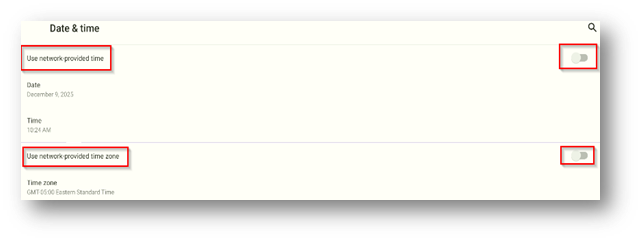
If the Google NTP is supported on your network, “Use Network Provided Time” can remain enabled, but we still recommend manually setting the “Use Network Provided Time zone” option to manual and setting your correct time zone.
ANDROID 13:
Even though the UI labels changed, Android 13 still reads NTP settings from the same sources as Android 10. Android 13 typically shows four core toggles (wording varies slightly across OEMs):
1. Set time automatically- Use network-provided time (NITZ)
- Use NTP fallback if NITZ unavailable
- Network-provided time zone (NITZ)
- Geo-based time zone detection (location-based)
- Wi-Fi location
- GNSS location
- Cell tower location to determine time zone if NITZ is missing or unreliable
- Editable only if Set time automatically is turned off.
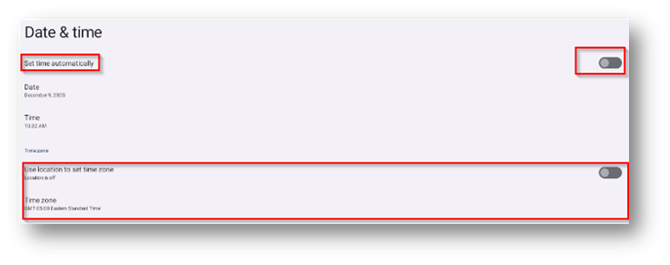
Similar to the Android 10 KDS configuration, If the Google NTP is supported on your network, “Set time automatically” can remain enabled, but we still recommend manually setting the “Use Location to set Time zone” option to manual and setting your correct time zone.